Network Security
Quick Note on Tool Choices
- For OPNSense and Tailscale refer to the README.
- For Traefik and Nginx refer to Traffic Flow.
- For Dnsmasq refer to Network Setup#DNS
My Isolation Approach
The participants in my network are
- users
- VM Hosts
- docker compose stacks by service
- individual containers
For network travel these are the roads available.
| Travel Road | Explanation of Reach | Management |
|---|---|---|
| Tailscale Mesh Network | anything with IP address and Tailscale Outbound -> anything present in Tailscale Mesh Network, advertised or proper | Access Controls |
| OPNSense VLANs with DHCP | host <-> host host <-> container (with macvlan interface) container (with macvlan interface) <-> container (with macvlan interface) | Firewall Rules |
| docker networks | container <-> container (each in the same docker network) | Docker iptables |
The goals here are to
- Principle of least privilege: Make it so everything with IP address can only reach what it needs to be able to reach.
- Trust-Based segmentation: Split the network participants based on trust and risk so that nothing leaks from a more risky part of the network or a risk user to important trusted parts of the Homelab.
As a result I have established and been following the below major rules in my Homelab which limit travel across the above roads.
| Rule | Any Exceptions to the Rule |
|---|---|
| Every Proxmox VM interface (host interface and interfaces for docker macvlans) has its own VLAN from OPNSense. | Tailscale traffic over port 41641 is allowed between all server networks and my LAN network additionally as this provides Tailscale direct connection functionality. |
| In every Docker Compose all their containers are kept within a custom external Docker bridge network specifically for that stack. | The main Traefik instance from the Ansible Role network_center and Docker Network traefik_tailscale is often given additional interfaces into other composes networks to be used in those networks additionally.Additionally from the same role and network Tailscale is sometimes included. |
| Every Docker Compose has its own Dnsmasq instance for private records. | Tailscale DNS is used for Tailscale outbound capable containers. |
| Users can only reach end services via the User-Gate to end Traefik proxy chain (refer to Traffic Flow). | Edgeshark which requires a direct two way connection with the user. |
| Tailscale container to container access within the same host is allowed. | Tailscale container to container access across different hosts and in turn VLANs is allowed when going through a Traefik Proxy at both the entrance and exit points between the end services to the manage the traffic. |
The end goal of following this path is zero trust where I operate under the assumption that threats could exist both inside and outside the network and defend against this accordingly.
The assumption phase I have been operating under from the beginning of the Homelab but the defense is something that I have not really done much beside laying the foundation for yet.
- Strict-as-possible classical network segmentation via OPNSense and Docker networks. (balancing available resources)
- Identity-based segmentation via Tailscale. More flexible access control while maintaining security.
- Monitoring
Firewall: Rules

All VLANs use the 802.1q protocol.
For firewall rules all VLANs inherit the default OPNSense rules and floating rules.
Default OPNSense 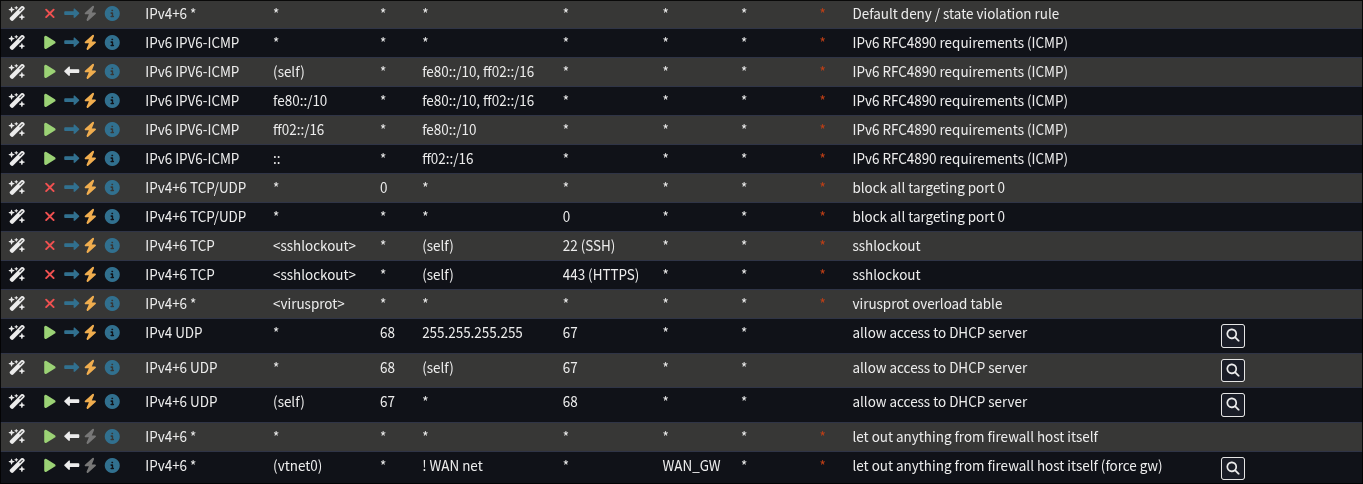
TIP
Explanation of OPNSense default rules.
- Default deny / state violation rule: if another rule allowing the traffic is not found, block the traffic
- IPv6 RFC4890 requirements (ICMP): default secure allow IPv6 usage
- block all targeting port 0
- virusprot overload table: protection against brute force attacks
- carp: recieves CARP packets and provides dedicated IP address for multiple networks
- this feature is meant for supporting a fail-over router
- https://docs.opnsense.org/manual/how-tos/carp.html
- allow access to DHCP server: links to DHCP config, even if all outgoing traffic is specially managed, this will allow outgoing traffic to the DHCP server without requiring specific VLAN level allow rules
- anti-lockout: allow access to router from any LAN address
- let out anything from firewall host itself (force gw): force use of set gateway for specific interfaces

Floating

All server VLANs are part of the SERVERS group giving them the below firewall rules. None of them have unique rules yet.
Firewall: IDS & IPS
OPNSense ships with Suricata for IDS & IPS functionality (depending on what is enabled).
I am currently have IDS & IPS both enabled with the following rulesets being using on my LAN interface in promiscuous mode because all my VLANs rest on the LAN interface.
- abuse.ch/
- Feodo Tracker
- SSL Fingerprint Blacklist
- SSL IP Blacklist
- ThreatFox
- URLhaus
- ET telemetry/
- botcc
- compromised
- dshield
- emerging-malware
My current policy is to for all traffic that matches any of the enabled rulesets' alerts, drop and alert.
In the future I plan to enable and tune more ruleset especially setting up more strict ruleset groups and policies for my server vlans but for the time being I am in a testing phase and focused on other work. Once my servers need more internet usage then this will need to change.
Firewall: Access
I disabled the default root user and setup a new one in the administrators group
For authentication I setup the TOTP Access Server with the type "Local + Timebased One Time Password".
As a result my only admin user requires my long bitwarden generated password plus a one time code generated via my Yubikey in the Yubico Authenticator App.
Web GUI and Proxmox console are the only allowed access method.
- SSH is not currently enabled and is only ever enabled temporarily if strictly required.
- The console driver is enabled so that access via Proxmox is possible in the case of a web portal failure. In the future I may disable this but because of a few bad situations I am leaving this for now.
For the Web
- GUI HTTPS is used with an SSL cert for my custom domain using the ACME Client.
- HTTP Strict Transport Security is enabled.
- Listen interface(s) contain LAN only.