Network Setup
IMPORTANT
What this document is and is not for.
This document is meant to provide an accurate in-depth read of my network architecture and configuration state.
Reasoning behind decisions made in reaching this state is kept in this document.
Physical topology of my full home is kept in this document.
An overview of traffic flow through my network as a whole is kept in this document.
OPNSense Configuration
| VLANs & Subnets |
|---|
 |
WARNING
Some of the service network listed here are planned but not currently active. See the below list for planned to go up very soon but are not yet active services.
- expenseowl
- NAS
- passwordpusher
- neko
- homepage
- commafeed
- rssbridge
- tagspaces
- synthing
- jellyfin
- pinchflat
- kasm workspaces
They are planned to be fully working one - two weeks.
VLAN Subnets & Assignments
TIP
Network Naming Schema Explained
networks backends: 10.20.<macvlan-number>.<address-range>
- day: 1
- server: 0-6
- network center: 8-14
- undecided: 16-22
- edgeshark: 24-30
- monitor outpost: 32-38
- dusk: 2
- server: 0-6
- network center: 8-14
- user gateway: 16-22
- edgeshark: 24-30
- monitor center: 32-38
- night: 3
- server: 0-6
- network center: 8-14
- undecided: 16-22
- edgeshark: 24-30
- monitor outpost: 32-38
- web_dev: 4
- server: 0-6
Subnet Details
Those in use below.
| Name | Tag | Subnet Address (CIDR) | Default Gateway | Available Range |
|---|---|---|---|---|
| Day | 101 | 10.20.1.0/29 | 10.20.1.1 | 2 - 6 |
| Day_Network_Center | 102 | 10.20.1.8/29 | 10.20.1.9 | 10 - 14 |
| Day_Edgeshark | 104 | 10.20.1.24/29 | 10.20.1.25 | 26 - 30 |
| Day_Monitor_Outpost | 105 | 10.20.1.32/29 | 10.20.1.33 | 34 - 38 |
| Dusk | 201 | 10.20.2.0/29 | 10.20.2.1 | 2 - 6 |
| Dusk_Network_Center | 202 | 10.20.2.8/29 | 10.20.2.9 | 10 - 14 |
| Dusk_User_Gateway | 203 | 10.20.2.16/29 | 10.20.2.17 | 18 - 22 |
| Dusk_Edgeshark | 204 | 10.20.2.24/29 | 10.20.2.25 | 26 - 30 |
| Dusk_Monitor_Center | 205 | 10.20.2.32/29 | 10.20.2.33 | 34 - 38 |
| Night | 301 | 10.20.3.0/29 | 10.20.3.1 | 2 - 6 |
| Night_Network_Center | 302 | 10.20.3.8/29 | 10.20.3.9 | 10 - 14 |
| Night_Edgeshark | 304 | 10.20.3.24/29 | 10.20.3.25 | 26 - 30 |
| Night_Monitor_Outpost | 305 | 10.20.3.32/29 | 10.20.3.33 | 34 - 38 |
| Web_Dev | 401 | 10.20.4.0/29 | 10.20.4.1 | 2 - 6 |
Assignments Details
NOTE
Static DHCP Mappings for Host VMs
Used by main.tf files for Terraform to generate interfaces.
| VLAN Name | MAC Address | IP Address |
|---|---|---|
| Day | 7a:7b:e2:51:43:90 | 10.20.1.6 |
| Day_Network_Center | be:bb:37:47:6a:84 | 10.20.1.10 |
| Day_Edgeshark | ee:76:24:18:a8:05 | 10.20.1.26 |
| Day_Monitor_Outpost | ea:35:e6:41:05:21 | 10.20.1.34 |
| Dusk | unassigned | unassigned |
| Dusk_Network_Center | 0a:1a:19:4f:3d:a0 | 10.20.2.10 |
| Dusk_User_Gateway | b6:36:f2:e6:16:65 | 10.20.2.18 |
| Dusk_Edgeshark | c6:3c💿de:22:0a | 10.20.2.26 |
| Dusk_Monitor_Center | ee:05:14:9c:4f:08 | 10.20.2.34 |
| Night | e6:20:5f:93:ec:ec | 10.20.3.6 |
| Night_Network_Center | ca:42:3c:61:6d:8f | 10.20.3.10 |
| Night_Edgeshark | 3e:1c:43:2e:50:5a | 10.20.3.26 |
| Night_Monitor_Outpost | 6a:c9:bd:ad:39:16 | 10.20.3.34 |
| Web_Dev | a2:30:57:48:b8:92 | 10.20.4.6 |
NOTE
Static DHCP Mappings for Containers
Used in host_vars Ansible files to generate Docker MACVLANs.
| VLAN Name | Host Name | Sidecars Containers | Mac Address | IP Address |
|---|---|---|---|---|
| Day_Network_Center | ts-network-center | none | c6:19:a8:7f:0e:39 | 10.20.1.11 |
| Day_Edgeshark | ts-shark | packetflix | a6:d2:73:22:72:d5 | 10.20.1.27 |
| Day_Monitor_Outpost | ts-monitor-outpost | traefik | da:91:79:c6:65:b6 | 10.20.1.35 |
| Day_Monitor_Outpost | ts-monitor-alloy | alloy | d6💿54:bc:a3:85 | 10.20.1.36 |
| Dusk_Network_Center | ts-network-center | none | da:f3:16:64:f3:30 | 10.20.2.11 |
| Dusk_User_Gateway | ts-gate | nginx dnsmasq | 56:9d:02:b2:98:a4 | 10.20.2.19 |
| Dusk_Edgeshark | ts-shark | packetflix | ee:fc:b4:df:9e:9c | 10.20.2.27 |
| Dusk_Monitor_Center | ts-monitor-center | alloy | 26:b9:e5:80:b3:c3 | 10.20.2.35 |
| Night_Network_Center | ts-network-center | none | fe:56:b6:04:f0:db | 10.20.3.11 |
| Night_Edgeshark | ts-shark | packetflix | 2a:ef:f6:79:56:48 | 10.20.3.27 |
| Night_Monitor_Outpost | ts-monitor-outpost | traefik | 1a:7b:14:b8:0f:5d | 10.20.3.35 |
| Night_Monitor_Outpost | ts-monitor-alloy | alloy | 2a:d4:1a:0f:09:40 | 10.20.3.36 |
Docker Configuration
NOTE
Network Naming Schema Explained
networks backends: 10.<vlan-number>.<backend-number>.address-range duplicates are intentional where a service requires multiple networks macvlans obey naming scheme above for vlans
- vlan & special group numbers
- web-dev: 100
- day: 110
- dusk: 120
- night: 130
- backends - docker network subnets
- network services: 0-19
- traefik_tailscale: 0
- dns: 1 (fix later: no longer in use)
- edgeshark: 2
- edgeshark: 3 (fix later: should be removed in future)
- gate: 4 (fix later: hard coded into compose)
- other operational services: 20-29
- monitor center/outpost: 20
- nginx_file_server: 21
- end services: 30-49
- commafeed: 30
- searxng: 31
- expenseowl: 32
- homepage: 33
- vikunja: 34
- jellyfin: 35
- passwordpusher: 36
- neko: 37
- homepage: 38
- network services: 0-19
Table of all docker networks currently in use.
TIP
- using
#instead of{}because this way table formats correctly #is filled based on Network Naming Schema
| Host(s) | Network Name | Type | Subnet Address (CIDR) | Default Gateway | Available Range |
|---|---|---|---|---|---|
| All | traefik_tailscale | Bridge | 10.#.0.0/29 | 10.#.0.1 | 2 - 6 |
| All | macvlan_network_center | Macvlan | 10.20.#.8/29 | 10.20.#.9 | 10 - 14 |
| day night | monitor_outpost | Bridge | 10.#.20.0/29 | 10.#.20.1 | 2 - 6 |
| day night | macvlan_outpost | Macvlan | 10.20.#.32/29 | 10.20.#.33 | 34 - 38 |
| day | t3_searxng | Bridge | 10.#.31.0/29 | 10.#.31.1 | 2 - 6 |
| day | t3_vikunja | Bridge | 10.#.34.0/29 | 10.#.34.1 | 2 - 6 |
| dusk | gate-tailscale-network | Bridge | 10.110.4.0/29 | 10.110.4.1 | 2 - 6 |
| dusk | macvlan_user_gate | Macvlan | 10.20.2.16/29 | 10.20.2.17 | 18 - 22 |
| dusk | monitor_center | Bridge | 10.120.20.0/28 | 10.120.20.1 | 2 - 6 |
| dusk | macvlan_monitor_center | Macvlan | 10.20.2.32/29 | 10.20.2.33 | 34 - 38 |
Host addresses in use within the above Docker Networks.
TIP
- host addresses refers to the last number in the address here
- the order of
ContainersandIP Host Addressesmatches to pair each entry together - leaving Macvlan networks out of this since those assignments are documented in the above VLAN Assignments section
Keep in mind the traefik container in many of these represents the traefik_tailscale network traefik container that has an additional interface in the given network with the given address.
- Containers that have multiple network interfaces will be
highlighted.
| Host(s) | Network Name | Containers | IP Host Addresses |
|---|---|---|---|
| All | traefik_tailscale | traefiktailscalednsmasq | 2 4 5 |
| day night | monitor_outpost | traefiktailscale_traefik tailscale_alloy cadvisor dnsmasq | 2 3 4 5 6 |
| day | t3_searxng | traefiksearxng | 3 5 |
| day | t3_vikunja | traefikvikunja | 3 5 |
| dusk | gate-tailscale-network | tailscale_nginx_dnsmasq | 2 |
| dusk | monitor_center | tailscaletraefikdns grafana loki mimir alloy cadvisor | 2 3 4 5 6 7 8 9 |
Tailscale: Groups, Tags, Hosts
Groups
| Group Name | Users |
|---|---|
| personal | my trusted devices |
| family | my immediate family |
| outside | anyone other than those above |
NOTE
groups family and outside are not currently in use because
- the homelab is not setup to support more people than me securely yet
- because of the above I am currently the only user of my Homelab
Tags & Hosts
Tags
TIP
- IP Addresses are set by the nodeAttrs block in the Tailscale Access Controls config.
- IP Pool is used for assigned addresses to a given target, the target being a tag in my case
| Tag Name | Hosts Applied To | Device Network(s) | IP Pool |
|---|---|---|---|
| ssh-server | Each Homelab Proxmox VM | VLANs: Day,Dusk,Night | "100.80.0.0/29" |
| day-shark-server | does not exist currently tailscale container + packetflix sidecar | does not exist currently edgeshark | "100.80.31.1/32" |
| day-server-network-center | tailscale container | traefik_tailscale | does not exist currently |
| dusk-server-network-center | tailscale container | traefik_tailscale | does not exist currently |
| night-server-network-center | tailscale container | traefik_tailscale | does not exist currently |
| dusk-gate-server | tailscale container + nginx sidecar | gate-tailscale-network | "100.80.1.1/32" |
| dusk-server-monitor-alloy | tailscale container + alloy sidecar | monitor_center | "100.80.20.3/32" |
| day-server-monitor-traefik | tailscale container + traefik sidecar | monitor_outpost | "100.80.20.1/32" |
| day-server-monitor-alloy | tailscale container + alloy sidecar | monitor_outpost | "100.80.20.2/32" |
| night-server-monitor-traefik | tailscale container + traefik sidecar | monitor_outpost | "100.80.20.4/32" |
| night-server-monitor-alloy | tailscale container + alloy sidecar | monitor_outpost | "100.80.20.5/32" |
| me-client | n/a | n/a | n/a |
| webvm-server | Web Dev Proxmox VM | VLAN: Web_Dev | "100.90.0.0/32" |
| ci-dev | Github Actions Runners | n/a | n/a |
WARNING
day-shark-serverneeds to be matched by tags for dusk and night, all with up to date nodeAttr IP Pool assignments- make IP Pool assignments for the network-center tags
Host Addresses
| Host Name | IP Address | Container_Network | Container_Name |
|---|---|---|---|
| day-traefik | 10.110.0.2 | traefik_tailscale | traefik |
| day-dns | 10.110.0.5 | traefik_tailscale | dnsmasq |
| day-monitor-outpost-traefik | 10.110.20.2 | monitor_outpost | traefik |
| dusk-traefik | 10.120.0.2 | traefik_tailscale | traefik |
| dusk-dns | 10.120.0.5 | traefik_tailscale | dnsmasq |
| dusk-monitor-center-traefik | 10.120.20.3 | monitor_center | traefik |
| night-traefik | 10.130.0.2 | traefik_tailscale | traefik |
| night-dns | 10.130.0.5 | traefik_tailscale | dnsmasq |
| night-monitor-outpost-traefik | 10.130.20.2 | monitor_outpost | traefik |
Host Networks
Note: these are not used in grants currently but handy to have access to
| Host Name | Subnet | Host Matching Docker_Network | Autoapproved True/Fasle | Tag Associated |
|---|---|---|---|---|
| day-traefik-net | 10.110.0.0/29 | day traefik_tailscale | true | day-server-network-center |
| day-monitor-outpost-net | 10.110.20.0/29 | day monitor_outpost | true | day-server-network-center |
| dusk-traefik-net | 10.120.0.0/29 | dusk traefik_tailscale | true | dusk-server-network-center |
| dusk-monitor-center-net | 10.120.20.0/28 | dusk monitor_center | true | dusk-server-network-center |
| night-traefik-net | 10.130.0.0/29 | night traefik_tailscale | true | night-server-network-center |
| night-monitor-outpost-net | 10.130.20.0/29 | night monitor_outpost | true | night-server-network-center |
TIP
The {host}-network-center tag is used for all of these routes. This is because the compose that includes the Tailscale instance with this tag has jinja templating for populating all the routes automatically from the host variable I provide.
SSH
| Source | Destination | Users |
|---|---|---|
| group:personal | tag:ssh-server | "autogroup:nonroot", "root" |
| group:personal | tag:webvm-server | "autogroup:nonroot", "root" |
Tailscale: Grants & Traffic Flow
| Tailscale Mesh |
|---|
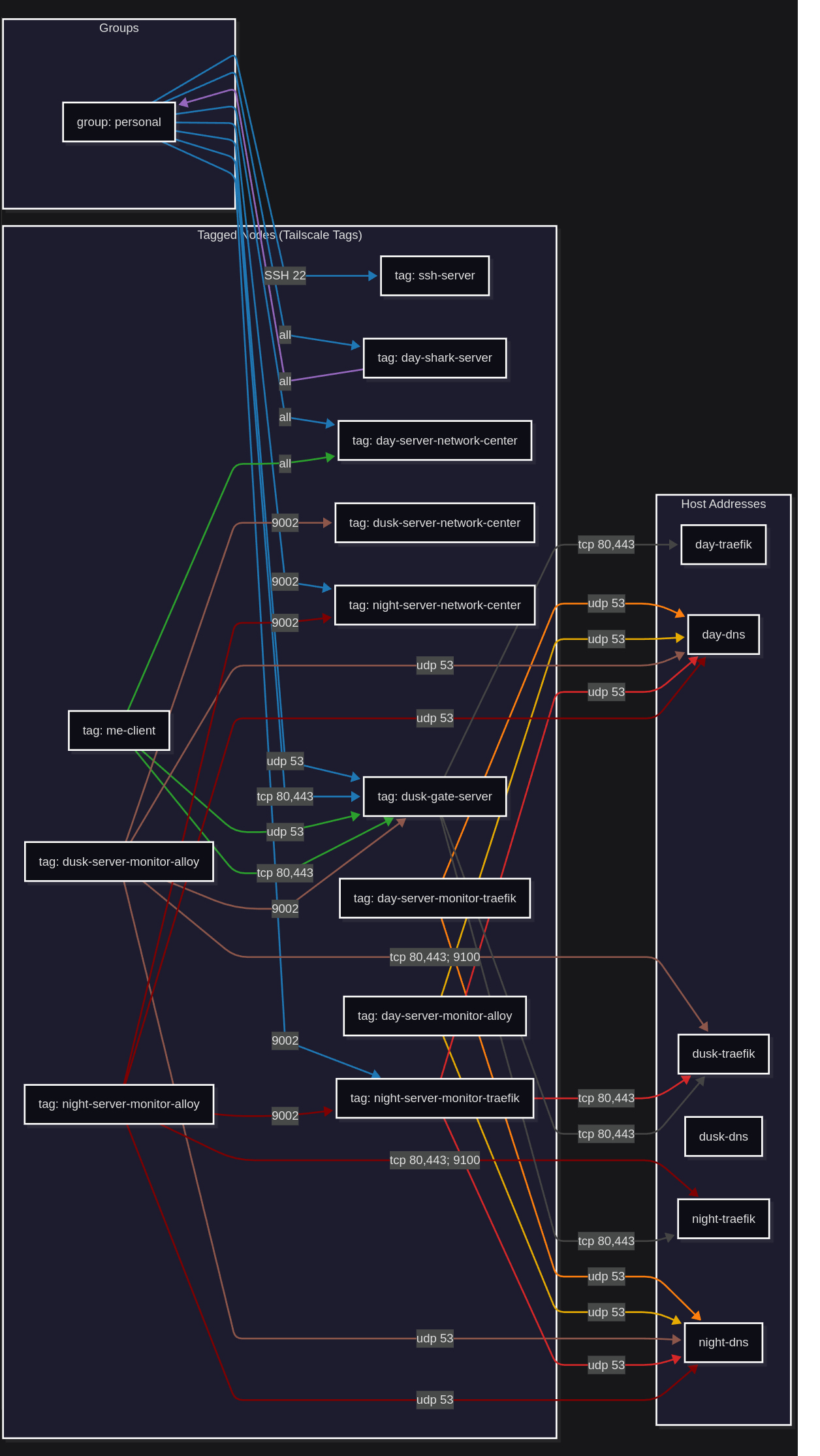 |
User Related
| Source | Destination | Host Destination Network | Protocols:Ports Allowed |
|---|---|---|---|
| group:personal | tag:ssh-server | VLANs: Day,Dusk,Night | *:22 |
| group:personal | tag:day-server-network-center | day traefik_tailscale | *😗 |
| group:personal | tag:day-shark-server | does not exist currently edgeshark | *😗 |
| group:personal | tag:dusk-gate-server | dusk gate-tailscale-network | udp:53 |
| group:personal | tag:night-server-monitor-traefik | night monitor_outpost | *:9002 |
| group:personal | tag:night-server-network-center | night traefik_tailscale | *:9002 |
| group:personal | tag:dusk-gate-server | dusk gate-tailscale-network | tcp:80, tcp:443 |
| tag:me-client | tag:day-server-network-center | day traefik_tailscale | *😗 |
| tag:me-client | tag:dusk-gate-server | dusk gate-tailscale-network | udp:53 |
| tag:me-client | tag:dusk-gate-server | dusk gate-tailscale-network | tcp:80, tcp:443 |
| tag: day-shark-server | group:personal | n/a | *😗 |
| group:personal | tag:webvm-server | VLAN: Web_Dev | *:22, tcp:80, tcp:443 |
WARNING
Need to join grants for destination:tag:dusk-gate-server.
Extra-VLAN Container to Container
| Source | Destination | Host Source Network | Host Destination Network | Protocols:Ports Allowed |
|---|---|---|---|---|
| tag:day-server-monitor-traefik | host address: night-dns | day monitor_outpost | night traefik_tailscale | udp:53 |
| tag:day-server-monitor-traefik | host address:dusk-traefik | day monitor_outpost | dusk traefik_tailscale | tcp:80, tcp:443 |
| tag:day-server-monitor-alloy | host address: night-dns host address: dusk-dns | day monitor_outpost | night traefik_tailscale dusk traefik_tailscale | udp:53 |
| tag:dusk-server-monitor-alloy | host address: day-dns host address: night-dns | dusk monitor_center | day traefik_tailscale night traefik_tailscale | udp:53 |
| tag:night-server-monitor-traefik | host address: day-dns host address: dusk-dns | night monitor_outpost | day traefik_tailscale dusk traefik_tailscale | udp:53 |
| tag:night-server-monitor-traefik | host address:dusk-traefik | night monitor_outpost | dusk traefik_tailscale | tcp:80, tcp:443 |
| tag:night-server-monitor-alloy | host address:day-dns | night monitor_outpost | day traefik_tailscale | udp:53 |
| tag:dusk-gate-server | host address: day-traefik | dusk monitor_outpost | day traefik_tailscale | tcp:80, tcp:443 |
| tag:dusk-gate-server | host address: night-traefik | dusk | night | tcp:80, tcp:443 |
WARNING
- Investigate the udp:53 grants.
TIP
Q: Why does tag:night-server-monitor-traefik reach out to host address:dusk-traefik instead of a new host address:dusk-monitor-traefik with a separate Traefik instance there.
A: Because this would require an additional Traefik which feels like it provides little benefit for me in terms of security. I still will probably set this additional instance up when my threat model goes up as I start locking down the Homelab.
Intra-VLAN Container to Container
| Source | Destination | Source Network | Destination Network | Protocols:Ports Allowed |
|---|---|---|---|---|
| tag:day-server-monitor-traefik | host address:day-dns | monitor_outpost | traefik_tailscale | udp:53 |
| tag:day-server-monitor-alloy | host address:day-dns | monitor_outpost | traefik_tailscale | udp:53 |
| tag:dusk-server-monitor-alloy | host address: dusk-traefik | monitor_center | traefik_tailscale | tcp:80, tcp:443, *:9100 |
| tag:dusk-server-monitor-alloy | tag:dusk-gate-server | monitor_center | gate-tailscale-network | *:9002 |
| tag:dusk-server-monitor-alloy | host address: dusk-dns | monitor_center | traefik_tailscale | udp:53 |
| tag:dusk-server-monitor-alloy | tag:dusk-server-network-center | monitor_center | traefik_tailscale | *:9002 |
| tag:night-server-monitor-traefik | host address: night-dns | monitor_outpost | traefik_tailscale | udp:53 |
| tag:night-server-monitor-alloy | host address: night-dns | monitor_outpost | traefik_tailscale | udp:53 |
| tag:night-server-monitor-alloy | host address: night-traefik | monitor_outpost | traefik_tailscale | tcp:80, tcp:443, *:9100 |
| tag:night-server-monitor-alloy | tag:night-server-monitor-traefik | monitor_outpost | monitor_outpost | *:9002 |
| tag:night-server-monitor-alloy | tag:night-server-network-center | monitor_outpost | traefik_tailscale | *:9002 |
| tag:dusk-gate-server | host address: dusk-traefik | gate-tailscale-network | traefik_tailscale | tcp:80, tcp:443 |
WARNING
- Investigate why no grants point to dusk-dns either here in Intra-VLAN grants and Extra-VLAN.
- Investigate why the monitor-alloy tag can go to the
traefik_tailscalenetwork with more than*:9100. tag:day-server-monitor-alloyneeds grants allowing Intra-VLAN scraping.- Investigate why
tag:night-server-monitor-alloyis using Tailscale to go to another container in its own Docker Network.
Keys
Total keys used: 10
Note: A role can have multiple keys and in turn multiple tags (tag per key) only when there are multiple tailscale containers in that role.
Containers with ts_auth_key.
| Ansible Role Name | Key Details | Tailscale Sidecar Details |
|---|---|---|
| network_center | 1 key (accounting for all hosts 3 keys) | no sidecars - single key "host-server-network-center" |
| nginx_gate | 1 key (accounting for all hosts 1 key) | nginx sidecar - single key "dusk-server-gate" dnsmasq sidecar - single key "dusk-server-gate" |
| monitor_center | 1 key (accounting for all hosts 1 key) | alloy sidecar - single key "dusk-monitor-alloy" |
| monitor_outpost | 2 keys (accounting for all hosts 4 keys) | traefik sidecar - first key "host-monitor-traefik" alloy sidecar - second key "host-monitor-alloy" |
To find them use (ctrl+f "TS_AUTHKEY: " case sensitive whole word) in this repo. It will show all docker composes where a Tailscale key is used.
Outbound-Capable Tailscale Containers
| Container Name | Capability Purpose |
|---|---|
| monitor_center | alloy container (sidecar): to scrape traefik and tailscale container not in its local docker networks |
| monitor_outpost | traefik container (sidecar): to send data to monitor_center |
| edgeshark | packetflix (sidecar): requires outbound capability (back and forth of inbound outbound traffic) to function |
| nginx_gate | nginx (sidecar): to forward traffic to the appropiate traefik container |
WARNING
Investigate the capability purpose of dnsmasq container (sidecar). Test later with existing sidecar setup and advertised subnet setup.
Direct Connections
Every Tailscale container has a Macvlan interface for supporting direct connections.
Pluses
- Using services that don't require internet access when the internet is down at home becomes possible.
- Speed is improved.
- Traffic analysis via packet capture is easier.
- Personal data not going through derp servers as much now.
Minuses
- Higher risk upon a compromised Tailscale container as it can reach outside it's given Docker networks. Note this is restricted by the access controls in Tailscale.
- The work involved in adding every new Tailscale container to my Homelab network goes up dramatically.
DNS
Docker DNS with Dnsmasq & Upstream Pihole
Every docker bridge network I made has a Dnsmasq instance in it meant for providing private DNS records for the containers in that network to use.
Almost always the private records block in the Dnsmasq config will only contain a wildcard for the local Traefik address in that network which will receive and forward all traffic using its host rules for DNS handling.
All non-private-container related DNS queries will be referred upstream to a Pihole instance I am self hosting.
WARNING
In the future this Pihole instance will need to move from where it currently is as an LXC on my Proxmox machine to being in an established VM to save resources. When this change is made the only Pihole instance may be split into two with
- instance on Day VM for LAN and Day VLAN usage
- instance on Dusk VM for Dusk VLAN and Night VLAN usage
Tailscale DNS
All Tailscale DNS usage is Split-DNS meaning the Tailscale DNS nameservers will only be used for the specified domain(s) they are paired with.
This project has three main domains for which Tailscale DNS is used, these are subdomains that treat any further domains after as part of the given listings (wildcard behavior)
- *.day.wiresndreams.dev
- *.dusk.wiresndreams.dev
- *.night.wiresndreams.dev
For each domain the associated nameservers are
nginx_gatedns: this is the user gate that filter incoming client traffic headed to service endpointsnetwork_centerdns: this is the host specific dnsmasq instance in the network center that provides the traefik address in its network
There are two additional domains meant for monitor outpost usage. They are needed because Tailscale outbound containers (of which there are two in monitor outpost) use Tailscale DNS.
Already in Tailscale DNS the base .host.wiresndreams.dev is covered meaning if a container with the same name (traefik in monitor outpost) is setup with a different nameserver there will be a conflict. Eg.
- points to different locations
- traefik.day.wiresndreams.dev: network center nameserver
- traefik.day.wiresndreams.dev: monitor outpost nameserver
Because of this a separate domain must be made to prevent a conflict. The separate domains include
- *.monitor.day.wiresndreams.dev
- *.monitor.night.wiresndreams.dev